vrijdag 18 november 2011

Remote Control: automated GUI test with Delphi and DUnit


Why...
For my current customer I wanted to do GUI testing too. I already made unit tests for the most important parts, but with a large code base it is impossible to test all functionality, especially when you have limited time...

Because users use the GUI to make orders and do all other stuff, I thought: why not start top-down instead of bottom-up? (I known, normally you should start bottom up, but again: I had limited time). 80% of the time they use 20% of the functionality, so it should be easy to test those parts which are mostly used. And when I click the same buttons in the GUI, a lot of stuff is automatically tested! (black box testing: you don’t know if each function is properly working, you only check the final result, which is okay: better do a coarse test than nothing!).

There are several tools to do GUI automation, but I wanted to program all stuff in Delphi and with DUnit: we have a good framework with a nice data tier and business tier, so it would be a lot easier to use the existing stuff to create for example an order with order lines, check in the database if the order is created with the correct values, and check if the new order is loaded in the GUI, press some buttons, and check the database again.

And also important: I do not want to “pollute” all applications with all DUnit stuff, and I want to test the GUI app “as is”: the same .exe the customer will use.

The idea...
So I started thinking:
  • we have RemObjects SDK, so I can very easy make a remote call from DUnitTesting.exe to our Client.exe (and start it with a command line option to enable the new remote control)
  • we have Delphi 2010 with new RTTI, so I can very easy invoke a function with an array of parameters etc.
  • we have HitXML (open source edition), so I can make a simple object tree with properties to sub objects, which are automatically created by HitXML, and I can save/load the whole object with XML. By using the same technique (auto create subobjets using rtti) I can name each object with its property name, and make a back link of the child to the parent. This way I can do a reverse lookup to retrieve a full object path.
Okay, maybe I can create a “lightweight remote interface proxy facade” thingy with HitXML, using the same object path and same component names as the client, so I can search for a button by using “TComponent.FindComponent”? And send the full path with RemObjects, including an array of parameters, and use the new RTTI to execute a function by name in the remote client?
Should be possible!

The result...
After some testing and hacking, I have the following proof of concept (stripped version of what we use internally). By the way: I replaced RemObjects SDK with a simple Indy TCP call because not everybody has RemObjects (but with RO it is easier :-) ).
I made the following simple objects, with the same name and classnames as the real ones in the remote client (a bit simplified for this blog):
 {$METHODINFO ON}    
 TBaseRemoteObject = class
   property Owner: TBaseRemoteObject read FOwner;
   property Name : string                           read FName write FName;
 end;

 TApplication = class(TBaseRemoteObject)
 published
   frmMain : TfrmMain;
   frmTest : TfrmTest;
 end;

 TForm   = class(TBaseRemoteObject);
 TFrame = class(TBaseRemoteFrame);

 TfrmMain = class(TForm)
 published
   btnShowModal: TButton;
 end;

 TfrmTest = class(TForm)
 published
   btnOk: TButton;
   btnCancel: TButton;
   framTest1: TframTest;
 end;

 TframTest = class(TFrame )
 published
   Button1: TButton;
   Edit1: TEdit;
 end;

 TButton = class(TBaseRemoteObject)
 public
   procedure Click;
 end;

 TEdit = class(TBaseRemoteObject)
 public
   property  Text : string  read GetText  write SetText;
 end;
In DUnitTesting I can now make the following calls:
RemoteApp.frmMain.btnShowModal.Click;    //create modal form frmTest RemoteApp.frmTest.framTest1.Edit1.Text := 'test';    //set textCheckEqualsString( RemoteApp.frmTest.framTest1.Edit1.Text, 'test' );  //check text
This would result in clicking “btnShowModal” of the main form, which will do a .ShowModal of “frmTest” (this is programmed in the remote client). All forms are normally accessible via the “Forms.Application” object or “Screen.Forms” array, so we can find “frmTest” in the remote root (RemoteApp). In this form, we have a frame “framTest1” with an editbox “Edit1”. I made a “Text” property which does a remote call in “SetText” and “GetText” to read and write the text:
procedure TEdit.SetText(const Value: string);
begin
 TRemoteControlExecutor.Execute(Self, 'Text', [Value]);   //set “text” property with value
end;

function TEdit.GetText: string;
begin
 Result := TRemoteControlExecutor.Execute(Self, 'Text', []).AsString;
end;
How does it work...
An explanation of how the reading and writing of “Edit.Text” works internally:
The “TRemoteControlExecutor” does a reverse lookup of “Self” (in this case “Edit1”) to get the full path (“frmTest.framTest1.Edit1”). This is send to the remote client, including the function or property we want to read/write (“Text”) and the parameters for it (explained below).
When the remote client receives the call, it does a “TThread.Synchronize” to the mainthread. Then it searches for the form “frmTest”: is it “Screen.ActiveForm”, or somewhere in “Screen.Forms[]” or using “Application.FindComponent()”? When found, it does a recursive lookup for “framTest1” and “Edit1”. After that, it searches for a function named “Text” in component “Edit1” using the Delphi 2010+ rtti. In this case it won’t find such a function, so it searches for a property, and yes: property “Text” does exist :-). Now, a simple trick is done to determine a read or write of a property: if we have 1 parameter it is a write, if we have no parameters it is a read. The rest is easy with the new rtti: .Invoke() for a function, and SetValue()/GetValue() for properties. The result is written and send back to the caller.
This way you can very easy control a remote client! Seems nice and straight forward to me, isn’t it?


Remarks
The TButton.Click is done using WM_LBUTTONDOWN + WM_LBUTTONUP, instead of executing the .Click function: otherwise when a .ShowModal is done we will get a “remote lock”!
I also had to do an “Application.OnIdle” check, because creating and painting can take some time, and when a remote message is executed as the first message after create, it can give some strange results.

Tips
Note: by using the same classnames, it is easy to set up to lightweight remote facade proxy classes: you can just copy the first part of the form, for example:
type
 TfrmMain = class(TForm)
   btnShowModal: TButton;
   btnShowFloating: TButton;
   procedure btnShowModalClick(Sender: TObject);
   procedure btnShowFloatingClick(Sender: TObject);
 private
   { Private declarations }
 public
   { Public declarations }
 end;

Of course, this can automated if needed... :-)

And by the way: by using “Application.OnMessage” and “Application.OnActionExecute” I can record the clicked buttons and actions (WM_LBUTTONDOWN, find control under mouse, etc). Not included in this demo, but can post another demo if needed?

I extended the XMLTestRunner.pas with the duration of each test, very handy to see how long each test functions takes!

With TCP you can also control multiple (infinite?) clients in a whole network, to do a “massive” test :-).


Reactions and comments...
See the code and try it yourself! What do you think about it? A good way to do GUI testing or are there better ways? Please let me know!
http://code.google.com/p/asmprofiler/source/browse/#svn%2Ftrunk%2F-Other-%2FRemoteControl

woensdag 23 maart 2011

SDN event vr. 18 maart (deel 2)

Bob Swart: Delphi XE en Intraweb XI
De 3e sessie ging over de nieuwste versie van Intraweb die bij Delphi XE meegeleverd wordt. Dit zijn echter beperkte versies: je kunt beter upgraden naar de volledige versie (oa SSL, source code, IP binding, etc).

De nieuwste Intraweb versie is flink verbeterd en opgeschoond, maar dit is wel ten koste gegaan van oude features: geen HTML3.2/WAP, geen verschillende browser versies, geen partial updates, etc. Dit waren destijds features die hun tijd vooruit waren maar nu niet meer relevant zijn met de modernste browsers. Het is dus niet 100% backwards compatible, maar daarvoor zijn wel betere features voor in de plaats gekomen: volledige AJAX/Async support, betere authentication, betere URL handling, data pools, meer deployment mogelijkheden, etc.

Vooral de eenvoud van async updates (AJAX) is erg mooi. Je kunt gewoon in design mode in Delphi je schermen opbouwen en hier events aan hangen. Alle code die je typt is gewoon Delphi code en wordt gecompileerd. Intraweb zelf zorgt voor alle afhandeling: dus geen gepruts met HTML en javascript! Onderwater worden de wijzigingen dmv XML berichten uitgewisseld en omgezet. Dit alles heeft als grote voordeel dat alles “typed” is en je geen hard coded “GetElementById(‘label1’)” hoeft te doen.
Als demo werd bijvoorbeeld een scherm gemaakt met een edit box, een button en een label. Dubbelklik op de knop waardoor een OnAsyncClick event gemaakt werd en hierin werd de volgende code getypt:

procedure Form1.Button1AsynClick;
begin
label1.Caption := Edit1.Text;
end;


Et voila: als je iets in de edit box typt en op de knop klikt, dan wordt deze tekst in de label gekopieerd. Zo eenvoudig is het dus! Geen HTML, geen javascript: Intraweb zorgt voor de server side AJAX call en de het bijwerken van de wijzigingen. Zodoende kun je je zelf bezig houden met het echte programmeerwerk :-).

Bruno Fierens: Getting the most out of IntraWeb

De 4e sessie werd gegeven in het belgisch: een plezante taal om naar te luisteren, met woorden als ge, performant, opkuisen, effekes, etc :-).

In deze sessie werd uitleg gegeven over de TMS Intraweb controls, onder andere over het TMS Intraweb grid. Dit grid is volledig async te gebruiken: cell edits, cell clicks, summary footers, sorting, paging, row selection en moving, etc. Elke cell is gewoon in Delphi code aan te passen, zoals je dat ook normaal gewend bent. Persoonlijk blijf ik paging een beperking vinden van html, maar met dit TMS grid en de Intraweb AJAX afhandeling is het programmeren in ieder geval heel gemakkelijk!
Uiteraard kun je zelf ook html en javascript uitvoeren, al dan niet met behulp van extra Intraweb functies.
Kijk op hun site voor meer controls (charts, dialogs, trees, datetime, planners, etc).

Het mooiste van deze sessie vond ik de demostratie van de nieuwste TMS iPhone controls:
deze zijn gemaakt met de focus op AJAX, lage bandbreedte door alles in HTML5 en CSS3 uit te voeren (geen images!), client side javascript, etc. De controls gedragen zich zoals normale iPhone controls doordat de specifieke touch events gebruikt worden. Hierdoor hoef je geen native iPhone app te maken, met alle elende van dien met de Apple App Store (keuring door Apple), 30% inkomsten betalen, etc.

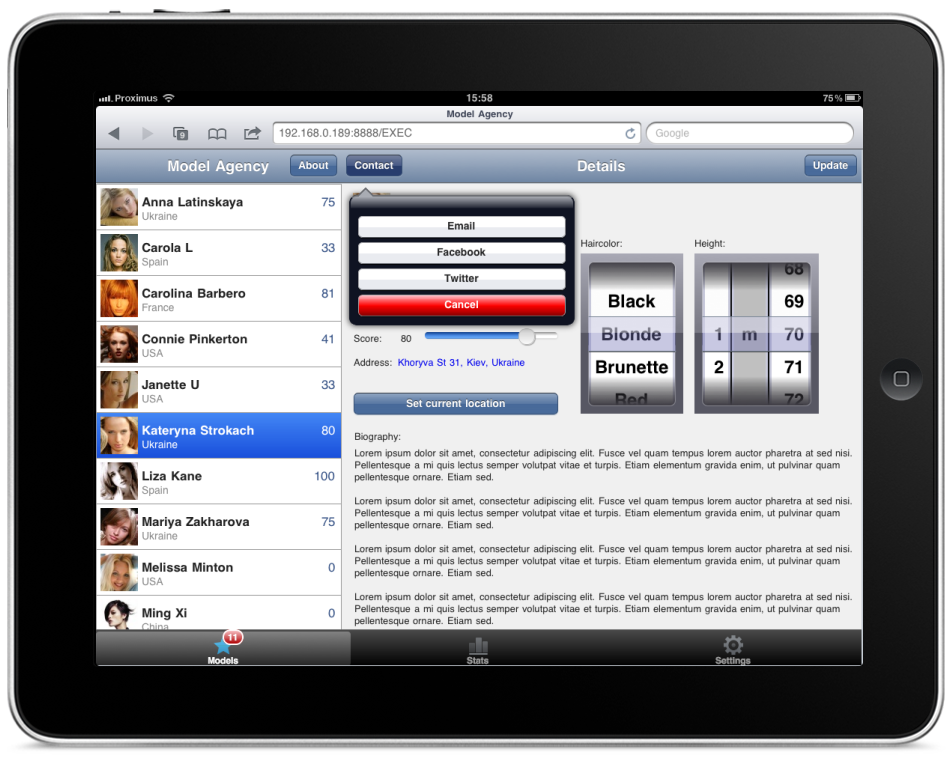
Als voorbeeld is voor de mannelijke programmeurs een “Model Agency” site gemaakt :-). Deze werkt erg mooi op een iPad (en in beperkte mate ook in Google Chrome, doordat deze geen touch events maar een muis heeft):
De focus ligt eerst op iPhone/iPad, daarna Android en vervolgens voor de Desktop (Google Chrome, Firefox 4, IE9, etc), zolang de browsers maar HTML5 ondersteunen.
Mocht je interesse hebben: ik heb deze demo zodat je hier zelf mee kunt spelen (helaas mag ik geen directe link geven).

SDN event vr. 18 maart (deel 1)

Afgelopen vrijdag 18 maart ben ik weer een keer naar een SDN event geweest. Het werd gehouden in het “Achmea Conferentie Centerin Zeist: een mooie locatie maar geen parkeergelegenheid dus je moest de auto op een vergelegen parkeerplaats parkeren en via een pendeldienst op en neer rijden...

Pawel Glowacki: What's Cooking in Delphi labs

Als eerste een sessie gevolgd over de ontwikkelingen die er gaande zijn voor Delphi. Sinds de overname door Embarcadero is er veel verbeterd en veranderd (touch & gestures, cloud support, etc) en er zijn veel plannen en ideeen voor de komende versies (data binding, biometrics, voice, social, universal cloud API, parallelization, mobile, etc). Helaas kon en mocht hij weinig concreets zeggen, maar er wordt veel in geinvesteerd. Wat dat betreft was hij blij met Embarcadero: een solide en kapitaalkrachtige onderneming, niet beursgenoteerd dus geen investeerders die zich bemoeien met de roadmap!

De volgende versie gaat in ieder geval 64bit Windows en cross platform (MacOs en Linux) ondersteunen. Dit alleen in de compiler: er komt vooralsnog geen speciale IDE versie voor MacOs etc (hoewel dat wel zou kunnen), ze willen zich eerst vooral op een goede Windows versie richten.

Wel nieuw was de aankondiging dat de volgende versie vector based GUI controls krijgt, die cross platform zijn! Dit is mogelijk door de overname van KSDev, de makers van DxScene en VgScene. Hiermee zijn erg mooie en snelle user interfaces te maken, die door DirectX of OpenGl gerenderd worden (zie een vorige blog van mij hierover). Daarnaast is alles “object based”, dat wil zeggen: je kunt een listbox maken en hierin elke control als item toevoegen (button, image, panel, etc) in plaats van alleen een “listitem”. Een grid met allerlei knoppen en treeviews is zodoende eenvoudig mogelijk. Uiteraard zijn allerlei effecten mogelijk (scaling, zooming, rotation, transparency, transition paths, etc).

Trouwens niets over “Project Cooper” van RemObjects: dit is een Java compiler voor Delphi Prism! Hiermee kun je dus oa “native java” voor Android ontwikkelen.

Sander Hoogendoorn: One man, one Whiteboard and three markers

De tweede sessie was vermakelijk, met allerlei grappen en grollen. Ik had een boek over architectuur van hem gelezen, maar niet geweten wat voor een drukke komiek hij was :-).
Het was de 2e sessie, gehouden zonder agenda: het publiek bepaalde de onderwerpen. In een rap tempo ging het over DDD, Domain models, Business Objects, Dependency injection, validation, logging, AOP, MVC/MVP/MVVM/MVWTF, etc. Weinig nieuws (bekende termen) maar wel met praktische voorbeelden uitgelegd.

Wel interessant was de benadering van domain types: een persoon heeft een voornaam en achternaam. In plaats van deze het “string” type te geven, kun je beter een “HumanName” class maken, want een naam heeft bepaalde karakteristieken: geen cijfers, alleen letters en spaties, geen andere tekens. Dus string is te algemeen. Hetzelfde geldt voor creditcard, BSN/Sofi, rekening- en telefoonnummers.

Ook een goed aandachtspunt was het niet gebruiken van business objecten bij grote acties: bijvoorbeeld uitvoeren van uitgebreide rapportages of het bijwerken van veel records (alle salarissen van een groot bedrijf +10%). Als je duizenden records als data/business objecten moet laden, ben je een hele poos bezig...

dinsdag 8 maart 2011

Minidump reader for Delphi

Preface
After releasing the newest version of our software to a customer, we got complaints about a hanging Windows Service. There were no errors or stack traces of those moments, so I wanted to take a look at that service when it hangs (mostly see the stacks of a threads) with my (simple) Process Stack viewer. However, it happened in the early morning and they also could not wait till I was logged in anyway because of the production process. So they directly restart the service when it happens. I already made a simple "all thread dump" (stack traces of all threads) which is executed when a service is stopped (you normally don't stop a service, so when you stop it there is something wrong). But not all services made such a dump, so they were really "hanging".
Minidump
The next solution was to make a minidump. This can be done by any program and contains all kind of information: dll's, threads, etc. It is a snapshot of the process. However, you need Microsoft compatible debug symbols to view it in WinDbg (part of Microsoft Debugging Tools). You can use map2dbg to convert a Delphi .map file to a Microsoft .dbg file, but this does not always work and more important: .dbg files are not supported and used anymore! Only .pdb files can be used (more about that in another blog).
Reading a minidump
Fortunately, reading a minidump file is good documented, and also the record structures are converted to Delphi in JwaImageHlp.pas (part of the JEDI Windows API libary). So I created a small app to read some contents of a minidump file: system and cpu information, loaded modules, threads, etc. However creating a stack trace is little bit difficult: jclDebug.pas can only create stack traces of the current process, not of an offline process! But I already created some code for this in my sampling profiler, so I copied this code and modified it a bit, et voila: the stack traces of all threads in a mindump! (you need the original exe with the corresponding debug information: .map file, embedded .jdbg file, etc).
Raw stack
I only made a simple "raw" stack tracer (not by stack frames yet), so you get a lot of bogus and false positives because everything on the stack that is a possible code pointer is shown. But at least it works! :-)
How to use
First you need to make a minidump: see the demo project how to do this.
Then you can load this in the Minidump Viewer:
1: Load the dump
2: Show minidump content
Note: the original exe is tried to be loaded from the original location as stored in the minidump. If this file cannot be loaded, it is tried to be loaded from the current directory. The location is shown besides the "Load original exe" button. Use this button if you want it to be loaded from a different location (before clicking the "Show minidump content" button!)
Note 2: make sure you have the right debug symbols! So the original .exe + original .map file, or even better: the original .exe with embedded JDBG.

ScaleMM: fast scaling memory manager for Delphi

I released yesterday a beta version of ScaleMM: http://code.google.com/p/scalemm/.

Scaling!
This memory manager scales perfectly on multi core and multi cpu systems. I made this MM because FastMM does not scale at all!
ScaleMM scales perfectly on a quad core sytem (horizontal line from 1 till 4 threads, x-axis, slowly increases till 16 threads) but execution time (y-axis) of FastMM/D2010 doubles when 2 threads are used (and quadruples if 4 threads are used! etc).

ScaleMM2
I made 2 versions: the first version worked on top of FastMM (or other MM) and only handled small memory (<>1Mb). It take some time however to make this second version, because the medium memory handling was more difficult to make (split one block in dynamic pieces of different sizes).

Speed
The speed of ScaleMM versus FastMM is difficult to say: my own benchmark with mixed sizes and operations shows ScaleMM2 is 3x faster than FastMM/D2010, but in other benchmarks (allocs of same size, first alloc all then free all) ScaleMM2 turns out to be 50% slower than FastMM/D2010.
I hope I can find some time to do some more investigation (why it is much faster in one and slower in another test). Also an ASM optimized version would help of course :-).

Quality
The quality of ScaleMM2 seems good: I made some simple unit tests, and also ran the FastCode MM Benchmark (good and extensive stress test!). I made a lot of internal "CheckMem" procedures which checks for corruption etc. But I haven't done a real life production test yet...

Future
I have many ideas to improve and extend ScaleMM: detailed logging and statistics/usage (overhead, amount cached and over allocated, etc), "GC" thread (delayed release of freed memory, in case same memory is needed in e.g. the next for loop, background handling of interthread memory, etc), "Object Garbage Collection", etc.

However: my spare time is low! So if anyone can help me (or any company to hire/pay me :-) )...

Denomo: GDI handle leak check for Delphi

Last week I had to find an anoying GDI handle leak in one of the touch panel apps of my current customer. After some time it ran out of resources.

I started ProcesExplorer, double clicked on the touch panel process (so I could watch the number of GDI handles) and clicked through some screens of the application. I saw a growing GDI counter...

Next I placed some breakpoints and stepped through the code to find out where it came from. It took me quite some time, but I finally found it (of course: in a place I did not expect :-) a TBitmap was created for a button everytime but never released).

Next day, I got the same bug issue in another application. So I started thinking how to speed up finding these kind of leaks. I knew there was an application that could do it for me, but I could not find it back on internet. But after some googling I found a Delphi project: Denomo. It detours a number of Windows API's, like CreateBitmap, CreateBrush, etc and generates a list of unreleased handles and a stack trace per handle (where it was created) when you close your applicaiton.
However, it was not (unicode) compatible with Delphi 2010, and it needed a dll to run and a remote control app for the logging.

I made some small changes to make it compatible with Delphi 2010 (unicode, at least for the parts I needed) and made it standalone (no dll + remote control needed):
http://code.google.com/p/asmprofiler/source/browse/trunk/EXT/Denomo/
I also made a small demo/test project:
http://code.google.com/p/asmprofiler/source/browse/trunk/EXT/Denomo/gdileaktest/Project7.dpr

Now I can find GDI handle leaks very easy!

vrijdag 5 maart 2010

DxScene = WPF for Delphi

Een van de mooie onderdelen van .Net is WPF: hardware accelerated vector graphics. Ik zat eens te denken of zoiets ook niet mogelijk was voor Delphi. Er bestaat namelijk een open source project genaamd "GlScene": een 3D library voor OpenGL. Deze heeft echter beperkte (?) ondersteuning voor een normale GUI. Via via kwam ik bij "DxScene": deze heeft wel een uitgebreide set aan GUI controls! Hiermee kun je net als WPF mooie GUI's maken.

VxScene en DxScene, en Themes
Op de site staan een aantal onderdelen:

Het mooie is dat je deze eenvoudig kunt combineren. Zo kun je VxScene binnen DxScene gebruiken, bijvoorbeeld een 3d cubus met aan elke kant een invoerveld en een knop etc. Maar ook allerlei 3d effecten zijn mogelijk (transparancy, mirroring, particles(zoals vuur!), glow, etc). Een "cover flow" is bijvoorbeeld eenvoudig te maken:

Cover flow
Cover flow

Hardware accalerated vector graphics

Het voordeel van vector graphics is dat je deze eenvoudig kunt scalen (vergroten, verkleinen), zonder dat dit lelijk (blokkerig) wordt. Met DxScene/VxScene zijn deze ook nog eens hardware accalerated, zodat de CPU niet belast wordt! Ondanks allerlei effecten en transities in bijvoorbeeld de "cover flow" (demo exe) blijft de CPU 0%... Niet alleen video's kunnen met 3d effecten afgespeeld worden, ook flash animaties. Een andere mooie demo is bijvoorbeeld een combinatie van VxScene en DxScene, waarbij de GUI gedraaid en gescaled kan worden (demo exe):
3d GUI
3d GUI

Nog een mooi voorbeeld is deze applicatie die ermee gemaakt is: 3D Image Commander

Design time editor
In tegenstelling tot WPF kun je eenvoudig designtime WYSIWYG de GUI samenstellen. Niet zo RAD als je normaal met Delphi gewend bent, maar je hoeft in ieder geval niet zelf een XAML samen te stellen of via een externe tool als expression blend

Data Binding
Net als WPF kent het ook data binding: je kunt bijvoorbeeld de X-as rotatie koppelen aan een animatie component (lineair of een "path")

3d import
Omdat 3d objecten snel complex kunnen worden, is het handig om te weten dat je allerlei 3d formaten kunt importen: 3d studio max (.3ds), Half-life, Quake en Doom 3 models, maar ook SVG en en WPF Mesh models. Zie hier een demo exe.

Newton: physics engine
Nog leuker wordt het als je het combineert met een "physics engine", oftewel natuurkundige berekening! Een leuke demo hiervoor is de klassieker "Breakout" in 3d met bots berekeningen (demo exe):

3D Breakout met physics

Multi platform, OpenGl
Zoals de naam al doet vermoeden, gebruikt DxScene op Windows DirectX. Maar het is echter ook multi platform: je kunt met FPC ook native Linux en MacOS X executables maken! Het kan dus ook overweg met OpenGl. Daarnaast kun je ook voor softwarematige versnelling kiezen, maar dit is uiteraard wel CPU intensief en trager.

Commercieel
Enige nadeel is dat het commercieel is, al is 100 euro niet duur voor zoiets moois.

Links

Conclusie

Het is natuurlijk niet hetzelfde als WPF, maar je kunt er wel erg mooie dingen mee maken, die ook nog eens cross-platform zijn! En je hebt alles in 1 exe zitten: geen .Net 3.5 installatie oid nodig :-)