Posts tonen met het label delphi. Alle posts tonen

donderdag 12 januari 2012

"Smart" business (OP4JS, Delphi/Pascal for Javascript)


After reading various blog posts about OP4JS (now named “Smart Mobile Studio”), I was very curious if I could use it for my current customer. We have a couple of RemObjects services, which contain our business logic (multi tier, SOA (service oriented architecture)), and we would like to create a HTML client for it (for iPad and Android).
I did a simple test with the latest alpha release, and it turned out to be relative easy! (it is an alpha, so no code completion, internal debugging, delphi shortcuts etc yet, so I had to do everything by hand :-) ).

First I made a simple RemObjects server using the Delphi Wizard:
Delphi -> New -> Other -> RemObjects SDK -> VCL Standalone:
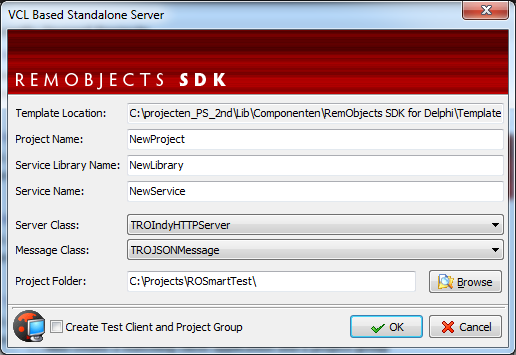
I selected HTTP server + JSON message format (needed for Javascript communication).

Default it already contains 2 functions: “Sum(A,B: Integer): Integer” and “GetServerTime: TDatetime” (see below for screenshot of the RemObjects Service Builder). When compiling the server for first time, it will generate a datamodule for the server side implementation for these 2 functions (I won’t post the implemention: a “sum” function is too simple :-) ). So we have a RemObjects HTTP server now, which listens to the default port 8099 and uses the JSON data format (normally we use TCP + Binary messages for fast and low overhead messaging).

Next, we need to generate some code for the client side. In the RemObjects Service Builder we can generate various client implementations: C++, PHP, Delphi (also automatic done in Delphi IDE) and also Javascript. In the latest RemObjects release they added a completely new Javascript implementation but I could not get it working yet, so I have taken the "old" JSON RPC implementation:
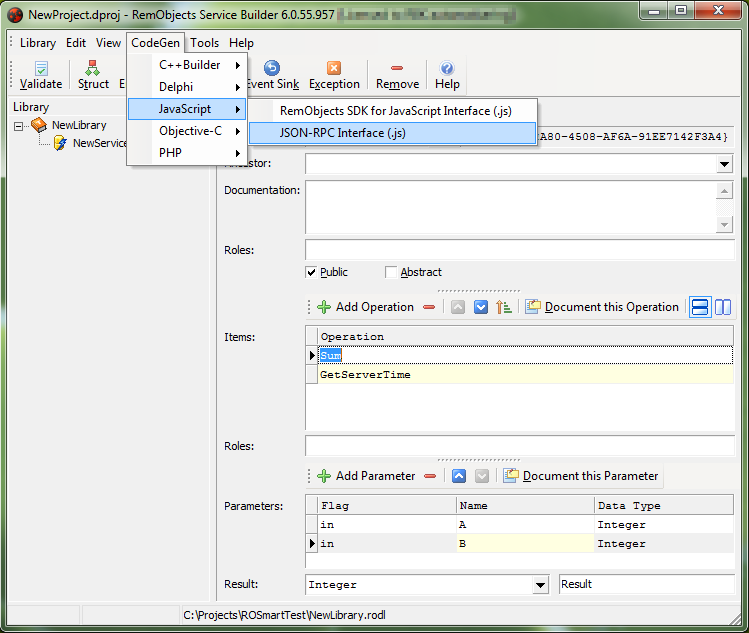
You need to download some extra Javascript files, because it is dependent on the Yahoo YUI toolkit (I have tested the RemObjects Javascript implementation before, so I already had these files).

After that, I started “Smart Mobile Studio” and played with the delivered demos. I created a new “visual project”, and added 2 edits, a button, and another edit to the form (all typing by hand, no designer yet):

Procedure TForm1.InitializeObject;
Begin
 inherited;

 FEdit1:=TW3EditBox.Create(self);
 FEdit1.setBounds(10,10,100,32);
 FEdit1.text:='2';

 FEdit2:=TW3EditBox.Create(self);
 FEdit2.setBounds(10,50,100,32);
 FEdit2.text:='3';

 FBackBtn:=TW3Button.Create(self);
 FBackBtn.setBounds(10,95,100,32);
 FBackBtn.Caption:='Sum';
 FBackBtn.Visible:=true;
 FBackBtn.OnClick := ButtonClicked;

 FEdit3:=TW3EditBox.Create(self);
 FEdit3.setBounds(10,140,100,32);
 FEdit3.text:='';
End;
I created a “button click” procedure, which calls my RemObjects server. Because I have to call some pure Javascript code, I used the “asm” keyword for my “low level” code:
Procedure TForm1.ButtonClicked(Sender:TObject);
var
 s1, s2, s3: string;
Begin
 s1 := Self.FEdit1.text;
 s2 := Self.FEdit2.text;
 asm
   var service = new NewService("http://localhost:8099/JSON");
   service.Sum(@s1,
               @s2,
               function(sumresult)
               {
                  TW3EditBox.setText(Self.FEdit3,sumresult);
               });
 end;
End;
Note: I had to put the values of the 2 edits in seperate variables, because I could not directly use “@FEdit1.text” in the “asm” block? For the result callback (async!) I had to do something different, so I used “TW3EditBox.setText(FEdit3,result)” because this code is generated by SmartMobileStudio too when you type “FEdit3.text := ‘value’.

This code almost works: I have to include the client Javascript files somewhere. You can include Javascript in the project, but also in the main index.html (like you normally do with html).   
 script type="text/javascript" src="lib/yahoo.js">
 script type="text/javascript" src="lib/event.js">
 script type="text/javascript" src="lib/json.js">
 script type="text/javascript" src="lib/connection.js">
However, SmartMobileStudio uses a temp dir when running from the IDE (so it misses my extra .js files), so I just compiled the project, and ran the generated index.html directly from the project dir in Google Chrome.

So it’s done now? No, I got an error in Chrome, because I call an other HTTP server from my (local) index.html:
I had to enable cross site calls in myRemObjects HTTP server:
 ROServer.SendCrossOriginHeader := True;
But then Chrome complains about “Access-Control-Allow-Headers”, so I manually changed this by overriding the RemObjects implementation of the internal Indy “Other” function:

ROHttpServerCommandOther           := ROServer.IndyServer.OnCommandOther; ROServer.IndyServer.OnCommandOther := InternalServerCommandOther;

procedure TServerForm.InternalServerCommandOther(AContext: TIdContext;
 ARequestInfo: TIdHTTPRequestInfo; AResponseInfo: TIdHTTPResponseInfo);
begin
 //original RO handling
 ROHttpServerCommandOther(AContext, ARequestInfo, AResponseInfo);

 //need to set extra allow-header
 if ROServer.SendCrossOriginHeader then
  AResponseInfo.CustomHeaders.Values['Access-Control-Allow-Headers'] := 'Origin,   X-Requested-With, Content-Type';
end;

And then it works! After the initial problems, it should be easy now to extend the functionality further. For example, I would like to create a "Javascript to Delphi wrapper class" generator based on the .rodl interface file, so I have type safety again (no asm sections in code, only in wrapper class).
I hope to blog about this more in the future...

Note: demo code + binaries can be found here. First start "\ROSmartTest\NewProject.exe" and then "\Project1\Project1\index.html"

vrijdag 18 november 2011

Remote Control: automated GUI test with Delphi and DUnit


Why...
For my current customer I wanted to do GUI testing too. I already made unit tests for the most important parts, but with a large code base it is impossible to test all functionality, especially when you have limited time...

Because users use the GUI to make orders and do all other stuff, I thought: why not start top-down instead of bottom-up? (I known, normally you should start bottom up, but again: I had limited time). 80% of the time they use 20% of the functionality, so it should be easy to test those parts which are mostly used. And when I click the same buttons in the GUI, a lot of stuff is automatically tested! (black box testing: you don’t know if each function is properly working, you only check the final result, which is okay: better do a coarse test than nothing!).

There are several tools to do GUI automation, but I wanted to program all stuff in Delphi and with DUnit: we have a good framework with a nice data tier and business tier, so it would be a lot easier to use the existing stuff to create for example an order with order lines, check in the database if the order is created with the correct values, and check if the new order is loaded in the GUI, press some buttons, and check the database again.

And also important: I do not want to “pollute” all applications with all DUnit stuff, and I want to test the GUI app “as is”: the same .exe the customer will use.

The idea...
So I started thinking:
  • we have RemObjects SDK, so I can very easy make a remote call from DUnitTesting.exe to our Client.exe (and start it with a command line option to enable the new remote control)
  • we have Delphi 2010 with new RTTI, so I can very easy invoke a function with an array of parameters etc.
  • we have HitXML (open source edition), so I can make a simple object tree with properties to sub objects, which are automatically created by HitXML, and I can save/load the whole object with XML. By using the same technique (auto create subobjets using rtti) I can name each object with its property name, and make a back link of the child to the parent. This way I can do a reverse lookup to retrieve a full object path.
Okay, maybe I can create a “lightweight remote interface proxy facade” thingy with HitXML, using the same object path and same component names as the client, so I can search for a button by using “TComponent.FindComponent”? And send the full path with RemObjects, including an array of parameters, and use the new RTTI to execute a function by name in the remote client?
Should be possible!

The result...
After some testing and hacking, I have the following proof of concept (stripped version of what we use internally). By the way: I replaced RemObjects SDK with a simple Indy TCP call because not everybody has RemObjects (but with RO it is easier :-) ).
I made the following simple objects, with the same name and classnames as the real ones in the remote client (a bit simplified for this blog):
 {$METHODINFO ON}    
 TBaseRemoteObject = class
   property Owner: TBaseRemoteObject read FOwner;
   property Name : string                           read FName write FName;
 end;

 TApplication = class(TBaseRemoteObject)
 published
   frmMain : TfrmMain;
   frmTest : TfrmTest;
 end;

 TForm   = class(TBaseRemoteObject);
 TFrame = class(TBaseRemoteFrame);

 TfrmMain = class(TForm)
 published
   btnShowModal: TButton;
 end;

 TfrmTest = class(TForm)
 published
   btnOk: TButton;
   btnCancel: TButton;
   framTest1: TframTest;
 end;

 TframTest = class(TFrame )
 published
   Button1: TButton;
   Edit1: TEdit;
 end;

 TButton = class(TBaseRemoteObject)
 public
   procedure Click;
 end;

 TEdit = class(TBaseRemoteObject)
 public
   property  Text : string  read GetText  write SetText;
 end;
In DUnitTesting I can now make the following calls:
RemoteApp.frmMain.btnShowModal.Click;    //create modal form frmTest RemoteApp.frmTest.framTest1.Edit1.Text := 'test';    //set textCheckEqualsString( RemoteApp.frmTest.framTest1.Edit1.Text, 'test' );  //check text
This would result in clicking “btnShowModal” of the main form, which will do a .ShowModal of “frmTest” (this is programmed in the remote client). All forms are normally accessible via the “Forms.Application” object or “Screen.Forms” array, so we can find “frmTest” in the remote root (RemoteApp). In this form, we have a frame “framTest1” with an editbox “Edit1”. I made a “Text” property which does a remote call in “SetText” and “GetText” to read and write the text:
procedure TEdit.SetText(const Value: string);
begin
 TRemoteControlExecutor.Execute(Self, 'Text', [Value]);   //set “text” property with value
end;

function TEdit.GetText: string;
begin
 Result := TRemoteControlExecutor.Execute(Self, 'Text', []).AsString;
end;
How does it work...
An explanation of how the reading and writing of “Edit.Text” works internally:
The “TRemoteControlExecutor” does a reverse lookup of “Self” (in this case “Edit1”) to get the full path (“frmTest.framTest1.Edit1”). This is send to the remote client, including the function or property we want to read/write (“Text”) and the parameters for it (explained below).
When the remote client receives the call, it does a “TThread.Synchronize” to the mainthread. Then it searches for the form “frmTest”: is it “Screen.ActiveForm”, or somewhere in “Screen.Forms[]” or using “Application.FindComponent()”? When found, it does a recursive lookup for “framTest1” and “Edit1”. After that, it searches for a function named “Text” in component “Edit1” using the Delphi 2010+ rtti. In this case it won’t find such a function, so it searches for a property, and yes: property “Text” does exist :-). Now, a simple trick is done to determine a read or write of a property: if we have 1 parameter it is a write, if we have no parameters it is a read. The rest is easy with the new rtti: .Invoke() for a function, and SetValue()/GetValue() for properties. The result is written and send back to the caller.
This way you can very easy control a remote client! Seems nice and straight forward to me, isn’t it?


Remarks
The TButton.Click is done using WM_LBUTTONDOWN + WM_LBUTTONUP, instead of executing the .Click function: otherwise when a .ShowModal is done we will get a “remote lock”!
I also had to do an “Application.OnIdle” check, because creating and painting can take some time, and when a remote message is executed as the first message after create, it can give some strange results.

Tips
Note: by using the same classnames, it is easy to set up to lightweight remote facade proxy classes: you can just copy the first part of the form, for example:
type
 TfrmMain = class(TForm)
   btnShowModal: TButton;
   btnShowFloating: TButton;
   procedure btnShowModalClick(Sender: TObject);
   procedure btnShowFloatingClick(Sender: TObject);
 private
   { Private declarations }
 public
   { Public declarations }
 end;

Of course, this can automated if needed... :-)

And by the way: by using “Application.OnMessage” and “Application.OnActionExecute” I can record the clicked buttons and actions (WM_LBUTTONDOWN, find control under mouse, etc). Not included in this demo, but can post another demo if needed?

I extended the XMLTestRunner.pas with the duration of each test, very handy to see how long each test functions takes!

With TCP you can also control multiple (infinite?) clients in a whole network, to do a “massive” test :-).


Reactions and comments...
See the code and try it yourself! What do you think about it? A good way to do GUI testing or are there better ways? Please let me know!
http://code.google.com/p/asmprofiler/source/browse/#svn%2Ftrunk%2F-Other-%2FRemoteControl


woensdag 19 september 2007

Adv. debugging: hook all exceptions!

In mijn vorige artikel schreef ik hoe je een “stack trace” kunt maken. Maar soms is dat niet genoeg. Je krijgt bijvoorbeeld een ongrijpbare “Catastrophic failure” of de stack trace geeft niet precies de echte exceptie weer. Dit komt omdat een stack trace niet goed werkt als deze in een try..except (of try..catch in C) afgevangen wordt. Als je namelijk onderstaande code probeert:


try
raise Exception.Create(’hier gaat het fout’);
except
raise; //deze regel geeft stack trace weer
end;


dan geeft de stack trace niet de 2e regel (Exception.Create) aan als de plek waar het fout ging, maar de 4e, waar de exception opnieuw geraised wordt. Nu is het in het bovenstaande voorbeeld wel duidelijk waar het fout ging, maar niet als de code groter is en geneste procedures heeft.

Ik heb dit namelijk zelf vaak meegemaakt. Dan dacht ik: ik heb een mooie exception handler met stack trace gebouwd, nu kan ik alle fouten precies lokaliseren en oplossen. Maar kwam ik menigmaal bij een stack trace uit op een try..except combinatie… Dan weet je nog niet waar het fout ging (vooral als het geen code van jezelf is, waar je de try..except kunt aanpassen).

Gelukkig kwam ik een andere JEDI unit tegen: JclHookExcept.pas. Hiermee is het mogelijk om ALLE exceptions binnen te krijgen! Het maakt namelijk een exception hook: de “RaiseException” functie van “kernel32.dll” wordt omgeleid (detouring, hier hoop ik ook een stuk over te schrijven) naar een eigen functie. Omdat hier alle fouten binnen komen, voordat ze door een try..except afgevangen worden, kun je deze fouten eenvoudig loggen!. Als je dan vaak smerige trucs toepast zoals:

try
i := StrToInt(string);
except
i := -1;
end;

dan val je gauw door de mand: de Econversion exception komt dan netjes via de exception hook binnen :-).

Wat ik vooral handig vind met deze exception hook, is dat je “verborgen” fouten in bijvoorbeeld dll’s kunt traceren, of “Catastrophic failures” kunt achterhalen. Voor dit laatste heb ik een voorbeeld gebruikt van een QC posting: http://qc.borland.com/wc/qcmain.aspx?d=6069
Hieraan heb ik de volgende code toegevoegd:


uses
JclDebug, JclHookExcept;


procedure AnyExceptionNotify(ExceptObj: TObject; ExceptAddr: Pointer; OSException: Boolean);
var
sError:string;
begin
if ExceptObj is Exception then
begin
sError := Format(’%s at adress %p: %s’,
[ExceptObj.ClassName, ExceptAddr,
(ExceptObj as Exception).Message]);

if OSException then
sError := ‘OS ‘ + sError;
sError := ‘HOOK: ‘ + sError;
MessageDlg(sError, mtError, [mbOK], 0);
end;
end;

initialization
JclStartExceptionTracking;
JclAddExceptNotifier(AnyExceptionNotify);

Dit geeft bij het uitvoeren de volgende afgehandelde fout:
—————————
Error
—————————
HOOK: Exception at adress 0047D639:
IErrorServer.RaiseServerError
Error at server side
—————————
OK
—————————

Normaal zou je alleen “Catastrophic failure” krijgen!