donderdag 22 augustus 2013

ADO Bug: do NOT use comments in parameterized sql queries in ADO/OLEDB!

Yesterday I finally found the cause of a problem in our middle ware service: after 1 hour the service did not return any results from the database anymore. The problem was using a sql comment -- in a query within a report...

Today I did some more investigation and found out WHY we got no results but also no errors.

For example, we could create a very simple query like this:
select *
from (select 1 as value) as dummytable
where value > ?
When we prepare this query in a ADO query (e.g. TADOQuery in Delphi) it will send the following sql to the server to determine the types (used to determine parameter type):
 set fmtonly on select v from  (select 1 as v) as t where 1=2 set fmtonly off
So it removes the "where" clause, replaces it with "where 1=2" and surrounds it with "set fmtonly on/off". This "fmtonly" thing instructs SQL Server to return only metadata.

So far, so good.
But when you use "--" comments within your sql (which is normally no problem) in combination with parameters, you're getting big problems! Take a look at what ADO (or OLEDB?) does with the next statement:
select *
from (select 1 as value) as dummytable
--dummy comment
where value > ?
When you prepare this query, you will see the next sql statement in SQL Server Profiler:
set fmtonly on select v from  (select 1 as v) as t
--dummy comment where 1=2 set fmtonly off
Can you spot the problem? Now the "set fmtonly off" won't be executed! So your connection stays in a "metadata only" state! And so, all queries that you execute after this won't return any results!

Conclusion: DO NOT USE COMMENTS IN PARAMETERIZED QUERIES!

dinsdag 23 april 2013

SQL Server and slow compile times of queries


I posted a message on Google+ on Friday about large compile times of queries on SQL Server.
(to be clear: the execution of the query was fast enough, it was slow only the first time).
I could get my query a lot faster by not using view-in-view-in-view, but I wanted to know why.
Today I found some more detailed information about (slow) compilations of queries.

xperf profiling

First, I found some information about using xperf with SQL Server, to profile the performance. In an old blog post I found an explanation about how to log stack traces with xperf too. This was what I was looking for: using a (free, 64bit) sampling profiler to find out what sqlservr.exe is exactly doing all the time!
(note: xperf.exe is now part of the "Windows Performance Toolkit (WPT)", you have to download the Windows ADK and install only WPT)
However, I got a cryptic error on the server: "xperf: error: NT Kernel Logger: Cannot create a file when that file already exists."
By closing Proces Explorer (which uses ETW events too for timing and performance information) I got it working on my own workstation (I did not want to install the (low level?) WPT on the server :), but xperf should also work by using xcopy?)

Viewing results

The next hurdle was getting my stack traces in the latest xperf (Windows Performance Analyzer). Again some "googling" and I found a newer blog post about xperf. It turned out I had to do the following:
1: load all sybols (takes a while) via the menu Trace -> Load Symbols
2: click on "display graph and table" icon (top right in for example CPU usage view)
3: show "stack" column in detail grid (right click in grid)
Inline afbeelding 1
As you can see, the most time it is busy with the "Optimize" procedure (ironic isn't it? :) ).
(note: 25% cpu is one core at 100% of my quad core pc, so 20% is actually 80% cpu usage)

Optimization phase

Armed with this information I could search further and I found some posts about the optimization phase.
Inside SQL Server: Parse, Compile, and OptimizeThe SQL Server Query Optimizer

Somehow I found a "deep dive" into the Optimizer, including some undocumented trace flags (!) for really low level inner details. Yeah! :)
http://sqlblog.com/blogs/paul_white/archive/2012/04/28/query-optimizer-deep-dive-part-1.aspxhttp://sqlblog.com/blogs/paul_white/archive/2012/04/28/query-optimizer-deep-dive-part-2.aspxhttp://sqlblog.com/blogs/paul_white/archive/2012/04/29/query-optimizer-deep-dive-part-3.aspxhttp://sqlblog.com/blogs/paul_white/archive/2012/04/29/query-optimizer-deep-dive-part-4.aspx

Too much information to handle for now, but at least (as far as I understand from the internal counters etc) it did not even complete the normalization phase due to too much groups and too large or complex tree. It timed out on "Simplification phase" (see part 2), so it didn't optimize at all? It seems so: the query is executing slower than my one big single select (24s vs 58s of all 30.000 records in a test db). I read somewhere that a view is some kind of a macro that is completely loaded to compile the plan. When you have a lot of "view-in-view-in-view", a lot of "macros" are loaded, which takes then a lot of time to process. It seems even worse: a subselect of the same content of a view is much faster to compile than using or joining the same view.


Remarks and questions

By the way, some remarks of my test:
  • I used a new database with no data in it (so it is probably even slower on big databases with larger statistics?)
  • I also tried to delete all auto generated statistics (and disabling auto generation of statistics) but this didn´t change anything (compilation stayed slow)
  • I also tried all SQL OPTION hints, but again, no effect
Some remaining questions:
  • why do I get a optimization timeout after 7s on my pc but after 15s on (an older, internal virtualized) server and 25s on a customer server?
  • I tested it on SQL Server 2008 R2, how would it perform on SQL Server 2012?
  • Why did we use so much views?
I hope to answer (some of) these question the next time.

Conclusion

Well, the conclusion hasn't changed: do not use many views in views! Or at least be aware of the consequences.

Some final tips


donderdag 24 januari 2013

DataSnap, RO, RTC, mORMot, WCF, Node speed test

After reading the "DataSnap test" blog article, I wanted to do some extra tests: RemObjects SDK (RO) and the effect of ScaleMM2. I also got a server build from RealThinClient (RTC) for testing.
To get some reference I downloaded the test servers and JMeter 2.8 and ran them on my pc. After that I got a RemObjects server working with JMeter so I could compare the results with the other solutions. I also made a "plain indy" server to mimic the plain Node.js test (to see what indy 10 is capable of).

Test setup

I tested on single PC: a quad core, Windows 7, 8gb computer; I used JMeter 2.8 with 50 threads and 1000 request per thread. I configured all test servers to use a threadpool of 50 (whenever this was possible).
It is a rather rough and quick test, no 3 times average etc: it is only used to get a quick indication of the performance. I also did not monitor the memory usage because most test servers had a low usage of about 6 or 9 mb (and memory is cheap :) ). Only ScaleMM2 versions use about 50Mb: each thread starts with its own 1mb memory block (this needs to be further optimized but it works for now).

Results

See below for the crowded results. Tip: the Google Chart is interactive, this will help to dig through the many bars...
Loading Google Chart...


Limitations

My test has some big limitations you have to be aware of:
  • I tested on "localhost" so no real network test with reliability, error rate, etc.
  • Because all software is ran on 1 pc, most results are cpu bound. This means the results have some kind of automatic "correction" for servers with a high cpu usage: these are "less efficient" and get "punished" for this: they will get a lower request rate.
    Again: it is not a real network test, it does not show the maximum possible speed. A real network test  should be done before conclusions or decisions can be made!
  • I did only a short test (50.000 request, so a couple of seconds), so no long term performance.

Observations (not conclusions :) )

So, how useful is this test then? Well, despite the rough chunks, you can however make some interesting observations:
  • RTC and mORMot both performs very good! 
  • however, mORMot has big differences between the results: it runs fast in admin mode (run as Administrator), but slower in normal user mode (higher kernel(red) cpu). Also the XE3 build acts weird: I could not make connections in user mode, only in admin mode and is much slower than the D2010 build! (same source, same release compiler options). Are there known slow downs in the XE3 compiler?
  • Node.js and "plain indy" have similar results, so Indy itself is quite fast (but slower than RTC and mORMot)
  • RemObjects SDK (RO) comes close to RTC and mORMot (and a little bit faster than WCF) but only(!) if ScaleMM2 and not Indy but Synapse or DX is used
  • RO, DataSnap and Indy benefit the most when using ScaleMM2. RTC and mORMot are very fast on themselves (less MM bound, so more optimized and more efficient?). But a multi threaded memory manager gets very useful when you start writing user code (creating string, objects, records etc) anyway.
  • DataSnap XE3 is disappointing, even with ScaleMM2 it performs much slower than the others. Also the performance drops very quickly! The first second(nr1) it does about 3500 request per second, but after a couple of seconds(!)(nr2) it drops to an average of 1700/s! See below for a ProcessExplorer screenshot, notice the steep drop of the IO chart at the bottom of the screen! Maybe some kind of increasing array or list that makes this logarithmic decline? Due to automatic session management? (but I don't want sessions, I want a fast stateless server!). Or maybe a lot of "interthread memory" is used, so a multithreaded MM needs to lock too? (cpu also gets lower which can indicate higher locking times?).
    Using Google's TCmalloc Memory Manager (Delphi unit, dll) instead of ScaleMM2 shows similar behavior however it starts lower and drops less steep.

Other remarks:

Some other minor remarks about the test:
  • Delphi software is compiled with D2010, only DataSnap is build with XE3 trial.
  • RTC server is compiled by www.realthinclient.com, also with D2010.
  • The fastest RTC settings are used, non blocking and not multithread are also very fast, but blocking and multithreaded gave me the best results
  • DataSnap with keep-alive is used, this gives me the 3500request/s but without it it gave about 3100/s
    (but keep-alive on a real network gives a high error rate?)

Todo

Some todo's:
  • I would like to test RemObjects SDK for .Net too: I saw they have a http.sys server (like mORMot) too!
  • I should redo the tests with multiple physical pc's but unfortunately I don't have that much good ones...
  • I will also build the "plain indy" server in Delphi XE3 to see if the XE3 compiler is really broken (maybe that's why DataSnap performs bad?)

Used server software

Some download links to the used servers:

donderdag 12 juli 2012

Indy 10 Websockets, RemObjects and realtime duplex events!

In a previous blog, I demonstrated a proof of concept of Websockets for RemObjects. The downside of the used implementation is that it is "websocket only", whereas websockets actually starts as a http connection. So it should be possible to have a webserver (in Delphi ofcourse :) ) which supports both normal http and websockets.
I also played with websockets for duplex communication (bi-directional), so a server can send something to a client at any time the server wants, without some kind polling needed by the client. I wanted to use this for RemObjects events too, which use normally polling (the normal tcp RO channels and the javascript http channel; RO also has "super" channels which are duplex too but also much "heavier" and complicated). Websockets are designed for "real-time" duplex communication, so it would be very nice to use it with RemObjects!

Result

Well, it took some time, but I made it! Because Indy has already a nice http server + client implementation (that is used by RO too) and because I could not find a good http implementation for synapse, I decided to make it with Indy 10. Unfortunately there was no code yet of websockets for Indy 10, so I took the official specification (protocol version 13) and started "hacking" :).
In short the result is:
  • an Indy IOHandler (TIdIOHandlerWebsocket), which reads and writes websocket frames (used by both server and client)
  • a Indy http + ws client (TIdHTTPWebsocketClient), which has a "TryUpgradeToWebsocket" function that can be used to try to upgrade to a websocket connection when the webserver supports it.
  • a RemObjects http + websocket channel (TROIndyHTTPWebsocketChannel), which uses the above http + ws channel.
  • a RemObjects http + websocket server (TROIndyHTTPWebsocketServer) (unfortunately "TROIndyHTTPServer" creates directly a "TROIdHTTPServer" without a virtual function, so I could not make a special Indy http + ws server), which support both http and websocket clients (!).
  • support for duplex RO events, both in Delphi and in Javascript(!)

Implementation

The IOHandler is not very complicated: it reads the websocket header and concatenates several frames (if it is fragmented) to a single message. And it writes the ws header and the raw data after it. One note: clients must send all data with a mask. This is needed because otherwise the http cache can be poisoned by a hacker via a special composed websocket message (all ws data is send via a http port), or at least something like this is stated in the specification :).

The Indy http client contains the logic for a special upgrade request, and the handling and checks for the response of the server. The upgrade request is a set of extra http headers, together with a SHA1 key. In theory the websocket connection can support some extensions (like gzip compression) and subprotocols (like SIP for VOIP) but this is not implemented yet.

The RemObjects channel tries to upgrade (once) to a websocket connection, but can also operate as an "old" http channel. The special addition in this channel is a lightweight background read thread. This in contrast to the RO super tcp channel, which has a dedicated read thread per connection. Because my customer has Windows RO services with connection/channel pools (multi-threaded, to support multiple concurrent client calls), I did not want to double the already high count of threads! However some kind of continuous reading of the client connections is needed because of the duplex character of websockets, like sending ping/pong frames by the server, sending/pushing data from server to a client at any time, etc. 
After some research I made a single background thread, which uses the tcp "select" winsock api call, which can wait for incoming data for up to 64 connection! This thread only handles unexpected data from the server (ping + close frames and RO events), normal RO dispatching of calls is done by the caller thread itself. This is enough for my customer because of the (probably) low traffic of RO events, but additional or dedicated threads can be made of course in case of higher loads in the future. 
A nice trick I have to mention is: I use dummy connect to 0.0.0.0 to stop the "select" wait in case a new connection is added or when the wait thread has to terminate. I don't know if there is a better way, but at least it works :). By the way: I could not use "WSAAsyncSelect" because Indy needs blocking sockets.

The Indy + RemObjects http server contains both the logic for (possible) upgrade requests and some extra RO specific handling. It has a seperate "execute" function for websocket contexts, otherwise the normal Indy http handling would give errors :).  

To support duplex RemObjects events (without polling!), I had to add a special message number at the end of each message. Positive numbers mean normal RO RPC calls, negative numbers mean RO events send by the server to the client. I did not "invented" this myself, but something similar uses RO in their super tcp channels too :). I also made a small javascript extension for RemObjects, to be able to use websockets channels and duplex events. Note: only binary messages can be used for RO events!

Quality

I already spent some fair amount of time to make it stable (like killing client + server while sending and receiving etc), so it should be stable enough to use. We are busy with a pilot project to see how this stuff in combination with Smart Mobile Studio will work (backend RO services, frontend html5 clients) and if it can be used in real-life production situations. Anyway, my customer allowed me to make it open source (hopefully it will be integrated in Indy 10 itself), so please test it, fix some bugs, add new features, etc!  


Demo

All right, enough text and theory, time for a demo :). For the demo I made a simple RO function, which will send a lot of "progress" events (during the call!) back to the client each millisecond (to stress test the communication :) ). I used the progressbar example of Lennart to demonstrate the high update speed of websockets in javascript using SmartMS. This works in both the html and the Delphi client:


For the Delphi client, you need to connect to the server by clicking for example the "Sum" button. If you have done this for both Delphi clients, you can press the "Progress" button in the web page (served by the same server!). Then you will see all 3 progress bars running at the same speed :).

Note: even Android 4.0 does not support websockets! You need Opera Mobile (and enable websockets) although my demo still did not work with it (haven't time yet to debug it). Or you need Chrome for Android (Android 4.0 and higher) and then my demo works fine. Probably I have to use long polling over http if I want to use it with older Android mobile phones... :(

Note 2: an RO event can also be send at any other time, for example when an other user logs in etc. To test this I added the button "Send event" on the server form (note: only for this demo :), normally you will make a Windows service for the server instead of a GUI app). Press the button and in both clients a popup will be shown:


(note: I only added a handler for this event in Delphi but it also works in javascript)


Download source and binaries

The source code of the Indy 10 websocket implementation, as well for the RemObjects extensions for Delphi and Javascript can be downloaded here (thanks to my customer: www.rbk.nl!). The source code of the demo can be downloaded here.


Conclusion

With this websocket for Indy 10 implementation, you have to use only 1 port for "everything": normal http file handling (via TROHTTPFileDispatcher), RemObjects communication via http (for webclients with no websocket support like Android :( ), tcp-like low overhead communication via websockets and realtime RO events! And you can of course also use it for normal communication between Delphi RO servers and Delphi RO clients, it is not only for web clients.

donderdag 21 juni 2012

RemObjects integration in Smart Mobile Studio (part 2)

In part 1, I explained how to create a very basic RemObjects service. In this post (part 2), I will show how easy it is to create a fancy looking mobile and web front-end for this service.
In the mean time, Smart Mobile Studio is updated(!), so get this new version to use the nice RO integration :).

First, we create a new project in Smart Mobile Studio (SMS):
Just choose a nice project name and press OK.

Now we can use the brand new RemObjects wizard to import our previous created RO service file:
(Smart Mobile Studio -> Tools -> Import Remobject SDK library)

In the wizard that pops up, we select our .rodl file (created by the "RemObjects Service Builder" tool):

We press the "import" button, and then we have a generated unit for our service!

As you see, it has a "{$R 'file:TestLibrary_intf.js'}" line in it. This javascript file contains the real client implementation, generated by the integrated RemObjects template engine in the wizard. This file is the same as you can generate with the "RemObjects Service Builder" tool. The magic is in some lines below. First we have our callback definitions (remember: everything is async! so no functions with a result, but you get the result async when the http call returns the value via the callback):
  TBasicService_Sum_Result = procedure(aResult: Integer);
  TBasicService_GetServerTime_Result = procedure(aResult: DateTime);
 Then the service class definition:

  { Service definition }
  TBasicService = class external 'BasicService'
    constructor Create(aChannel: TROHTTPClientChannel;
                                 aMessage: TROMessage;
                                 aServiceName: string = "BasicService");
    procedure Sum(
               A: Integer;
               B: Integer;
               aCallback: TBasicService_Sum_Result;
               aOnError: TErrorResult);
    procedure GetServerTime(aCallback: TBasicService_GetServerTime_Result;
                                            aOnError: TErrorResult);
  end;

You see the "external" keyword? This means our "BasicService" class maps directly to the javascript "BasicService" object (defined in the included $R TestLibrary_intf.js). We have a constructor with 3 params, which maps to the JS constructor. And we have 2 procedures (not functions!): Sum and GetServerTime. These are the same as defined in the .rodl file and implemented on the server side. Both procedures have a least a result callback and an error callback (in case the connection gets lost etc).

Before we can call these functions, we will make a simple form with some components on it. We place some labels and textboxes and a button on the form:

We can preview how it looks like using the preview button:

Looks nice isn't it?


Code

Now some real code and fun :). We go to the source ("Source" tab or press F12), create a button click event, and attach it to the button OnClick:
type
  TForm1=class(TW3form)
  private
    { Private methods }
    {$I 'Form1:intf'}
  protected
    { Protected methods }
    Procedure InitializeObject;override;
    Procedure FinalizeObject;override;
    Procedure StyleTagObject;reintroduce;virtual;
    Procedure Resize;override; 
    procedure btnSumClick(Sender: TObject);
  end;
Procedure TForm1.InitializeObject;
Begin
  inherited;
  {$I 'Form1:impl'}
  btnSum.OnClick := btnSumClick;
End;

procedure TForm1.btnSumClick(Sender: TObject);
begin
end;
To be able to call our RO service, we have to add the following uses clause:
uses
  RemObjectsSDK,
  TestLibrary_intf;
Now we can create a http channel, a JSON message, attach this to our client side TBasicService object and then call the Sum function:
procedure TForm1.btnSumClick(Sender: TObject);
begin
  var chn := TROHTTPClientChannel.Create("http://localhost:8099/JSON");
  var msg := TROJSONMessage.Create; 
  var srv := TBasicService.Create(chn, msg);
  srv.Sum(
    edtValue1.Text.ToInteger, edtValue2.Text.ToInteger,
    procedure(aResult: Integer)
    begin
      edtResult.Text := aResult.ToString;
    end,
    ROErrorCallback);
end;
We supply the 2 values of the 2 editboxes, and when calculation is done (on the server), we put it in the 3rd editbox (using an inline anonymous method).

Run

Now compile this and run it! ("Execute" or F9 in SMS). Oh, and don't forget to run the server we made in part 1!
We click on the "Sum" button and.... hmmm, not exactly what I wanted...

The reason is, I forgot something in the server project (in part 1): I must set the property "WrapResult" of the TROJSONMessage to True (see "Tips & Tricks" in this RemObjects wiki item). Now we recompile our server, run it, and click on the "Sum" button again:

That's better :).
And this is how it looks on an android smartphone (Samsung Mini, Android 2.3):

Now, is this very cool or not!? :)
It is of course a very simple example, I hope to blog more about this in the future.

Demo

If you want to run this demo yourself:

Note: string/integer helper classes

Note: I added 2 helper classes for "string" and "integer" to be able to use ToInteger and ToString on these basic types (like "edtValue1.Text.ToInteger"):
type
  TString_helper = helper for string
    function  ToInteger: Integer;
  end;
  TInteger_helper = helper for integer
    function  ToString: string;
  end;
function TString_helper.ToInteger: Integer;
begin
  Result := StrToInt(Self);
end;
function TInteger_helper.ToString: string;
begin
  Result := IntToStr(Self);
end;


vrijdag 15 juni 2012

RemObjects integration in Smart Mobile Studio (part 1)

In the next update (planned the 18th) of Smart Mobile Studio (SMS), full support for RemObjects SDK services will be added.
With RemObjects (RO) it is very easy to make multi tier applications. For example, you can create one or more RO services (as middle tier) to centralize your main business logic. And with the next SMS update, it is very easy to create nice looking mobile and web front ends (presentation tier) for these remote services!

In this blog, I will try to explain the basis steps to create a RemObjects service. And in the next blog I will explain how to use this RO service in (then updated) Smart Mobile Studio.

Under the hood

Under the hood, the SMS RO integration is actually a typed wrapper around "RemObjects for Javascript" (SMS generates javascript (JS) code after all :) ), and not a complete new implementation. This way, the high RO quality is maintained and all RO features are supported. Also future updates of "RO for JS" can be applied. However, SMS cannot apply smart linking and obfuscation to this external JS code.

Basic RemObjects service

First, we will create a very basic RemObjects service in Delphi, using the nice and easy RO wizard:
(Delphi -> File -> New -> Other -> RemObjects SDK)

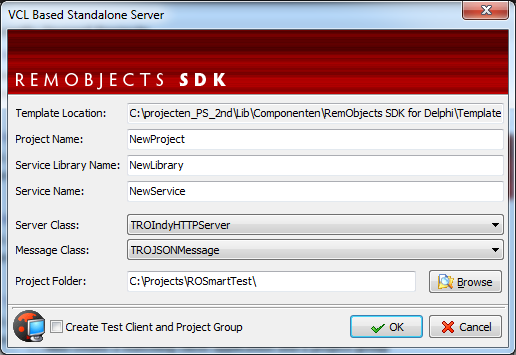
We choose for "VCL Standalone", because this is the easiest to start with (but if you plan to create a Windows service (for Intranet deployment), I can recommend to use the "Combo Service/Standalone" option). The first page of the RO wizard will be shown:

We choose a project name and folder, and we click on the "Advanced Project Options" for some more settings:

Here you can name the first "RO service" within the "RO library" (normally you will create a number of services, e.g. an OrderService for all order functions, and one library per Windows service). Most important is the HTTP "Server class" (in this case based on Indy, but you can choose other implementations), because this is the only option supported by "RO for JS" to communicate with the server (a browser cannot use plain TCP or Windows messages, however I already made a websocket server class). Next, we can choose between JSON and Binary message format. JSON is supported by all browsers, but binary is not fully supported by Internet Explorer (IE), so we choose for JSON to be on the safe side.

When we finish the wizard, RO will generate a server project for us:

The first thing we do is setting the "SendCrossOriginHeader" to true! This is needed, because our Smart app will run standalone and seperate from the http server. However modern web clients do not allow to call other foreign web servers (for safety reasons). There are other ways to solve this, but for internal use this single setting is the easiest :).

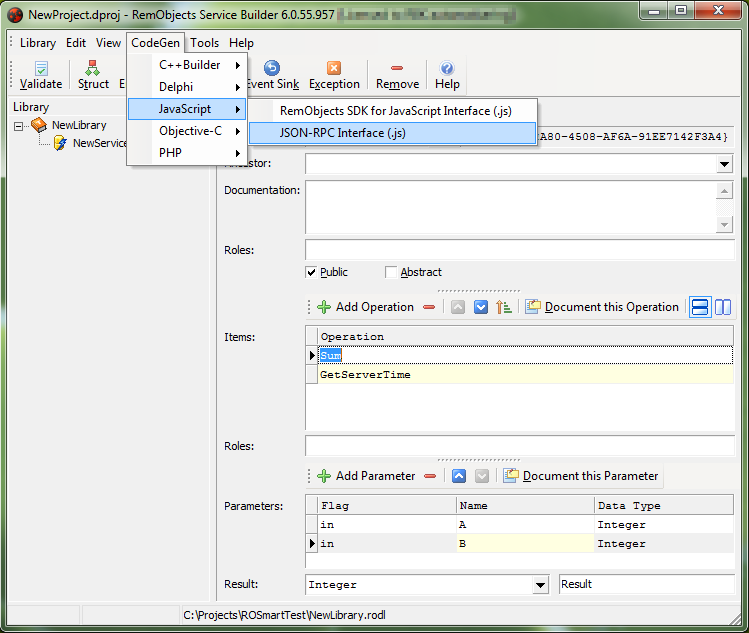
The next step is less obvious for first time RO users: we start the seperate "RemObjects Service Builder" tool  (via Delphi -> RemObjects SDK -> Edit service library). The RO wizard has created our BasicService with default 2 functions: "Sum" and "GetServerTime":

We can add more functions, structures, arrays, etc but we will leave this for now. We just close this tool and compile our server project in Delphi. Every time we create a new RO service within the RO Service Builder tool, the RO integration in Delphi will ask once at the next compile to create a implementation unit for the defined service:

We now have a "BasicService_Impl.pas" datamodule, which contains our 2 functions:
    function Sum(const A: Integer; const B: Integer): Integer;
    function GetServerTime: DateTime;
We will implement the simple :) functionality as follows:
    function TBasicService.Sum(const A: Integer; const B: Integer): Integer;
    begin
      Result := A + B;
    end; 
    function TBasicService.GetServerTime: DateTime;
    begin
      Result := Now;
    end;
This is all we have to do for our first RemObjects service, easy isn't it? :)
In the next blog post we will create a Smart client to use this remote service.

vrijdag 1 juni 2012

Remobjects via Websockets and in Node.js

After playing with Smart Mobile Studio (SMS) and RemObjects for Javascript, I thought it would be cool to have a HTML5 websocket communication channel (instead of only http). Note: websockets are some kind of "TCP over HTTP", so very efficient and fast for e.g. binary data.
At my current customer we use TROIndyTCPChannel and TROBinMessage internally, because this is the fastest option.

Websockets in Delphi

Because RO does not have websocket support (yet), I tried to make a Proof of Concept (PoC) to see if it is possible. I searched and tried some Delphi implementations, but one was old (Indy9, old websocket spec), otherone had no sourcecode yet (Indy10, no  response on my mail so far), etc. I found one which is based on "synapse", which is also included in RO, namely "bauglir-websocket".
I looked at how RO made their TRO***Server and TRO***Channel and made a simple implementation for websockets: uROWebsocketChannel.pas and uROWebsocketServer.pas. This was almost too easy :).
I tested this with a Delphi RO demo server and client (using the RO wizard) and: tada, it works! :).

RO websocket channel

Next I had to make a websocket channel in "RemObjects for Javascript", and after some copy and paste I added this to the end of the RemObjectsSDK.js file. I made a simple html test file and this one works too!

Node.js

Okay, what can we do next? Make a websocket server in html? Hmm, websockets (in html) can only make client connections and cannot act as a server...
Maybe I can use it in Node.js? Note: Node.js is a server side javascript implementation, based on the Google V8 Javascript engine.
I found a websocket chat demo in Node.js, so it should be possible... Because it is not easy to debug in Node.js, I tried to make it work in Google Chrome first, by using the "websocket.onmessage" event and by sending a fetched JSON string (using the network debug tab in Chrome) when the html page connects to my  Delphi server. After some hacking I could read the RO message, do the "sum" and send the data back to the client. Sweet!
After some little more hacking I also had it working in Node.js! So both my html page and my Delphi client can connect to the Node.js server. Ain't that cool! :)

Download and test

If you want to test it yourself, you can download the zip file, and do the following:
- start "ROWebSocketsServer.exe"
- start "ROWebSocketsClient.exe" and open "\client\client.html"
- push the sum buttons, both should work

- stop "ROWebSocketsServer.exe"
- start the node.js server via "\node\start RO.node.bat"
- push the sum buttons in the clients (maybe restart them?), both should work too :)


woensdag 9 mei 2012

I made a Proof of Concept debugger for "DWS to Javascript" (so it's also possible with Smart Mobile Studio :) ), using the WebKit Remote Debugging Protocol of Google Chrome. The protocol is JSON based over WebSocket. The specification of these communication JSON objects is nicely documented here, for example the supported debugger commands.

My PoC is a modified version of the MandelbrotJS demo of DWS. I used the websocket implementation of "Delphi on Rails" and for JSON handling I used "superobject". This made the PoC very easy to make!

Some screenshots of the PoC in action:
First, when it's started:

Next, after the "Compile and Run" button is pressed:
(note: chrome.exe is started with "--app" and embedded afterwards in the tab, so no TChromium but the latest version of Google Chrome! I also added a "setInterval" so we can add breakpoints to executing JS code)

Now we can click the "Remote Connect" button to connect to the remote Chrome.exe instance via the remote debugging protocol. When this button is pressed, the debugger is activated and gets (async) a list of loaded script files (in our case only 1 html file). We click on the "Load debug script" button to load the latest script in our debugger:

The debugger is running (we can only "pause" now), and we can add a breakpoint by double clicking on a line, for example line 14:

Because of the "setInterval" this code is executed every second, so we get soon a real breakpoint! Because of my "/*@15*/" code added to the generate JS, the debugger can determine the original Delphi/Pascal source line (with extra offset of "<%pas2js"), which is highlighted and selected in SynEdit (see above).
Also the current stack and the "scope" (local variables) and the properties/values of the local variables are loaded and shown at the left side (note: double clicking on the stack of scope also works: source code position is updated, local variables etc). And hoovering above a variable shows the current value (and the JSON object is also shown for debug purpose).

Pressing the "Step over" button continues the execution to the next line. Because DWS has no line numbering info for each symbol and line, I could not add the magic "/*@" to all the code, so the debugger now shows the current line in the Javascript code:
(note: I stepped a bit further than line 16)
The values of variables are updated, so it gets refreshed every time. The debugger really works!

And to show the stack and scope can be inspected too (double click on the item):
(note: line 61 is selected, is not shown here. And yes it should be line 60, nice off by one error...)

So go ahead, grab the code and play with it!

Conclusion: it it possible the debug Delphi/Pascal code in "DWS to Javascript", but DWS should be modified a bit more, so debug info is generated for each line (in a different debug symbol file?).

donderdag 12 januari 2012

"Smart" business (OP4JS, Delphi/Pascal for Javascript)


After reading various blog posts about OP4JS (now named “Smart Mobile Studio”), I was very curious if I could use it for my current customer. We have a couple of RemObjects services, which contain our business logic (multi tier, SOA (service oriented architecture)), and we would like to create a HTML client for it (for iPad and Android).
I did a simple test with the latest alpha release, and it turned out to be relative easy! (it is an alpha, so no code completion, internal debugging, delphi shortcuts etc yet, so I had to do everything by hand :-) ).

First I made a simple RemObjects server using the Delphi Wizard:
Delphi -> New -> Other -> RemObjects SDK -> VCL Standalone:
I selected HTTP server + JSON message format (needed for Javascript communication).

Default it already contains 2 functions: “Sum(A,B: Integer): Integer” and “GetServerTime: TDatetime” (see below for screenshot of the RemObjects Service Builder). When compiling the server for first time, it will generate a datamodule for the server side implementation for these 2 functions (I won’t post the implemention: a “sum” function is too simple :-) ). So we have a RemObjects HTTP server now, which listens to the default port 8099 and uses the JSON data format (normally we use TCP + Binary messages for fast and low overhead messaging).

Next, we need to generate some code for the client side. In the RemObjects Service Builder we can generate various client implementations: C++, PHP, Delphi (also automatic done in Delphi IDE) and also Javascript. In the latest RemObjects release they added a completely new Javascript implementation but I could not get it working yet, so I have taken the "old" JSON RPC implementation:

You need to download some extra Javascript files, because it is dependent on the Yahoo YUI toolkit (I have tested the RemObjects Javascript implementation before, so I already had these files).

After that, I started “Smart Mobile Studio” and played with the delivered demos. I created a new “visual project”, and added 2 edits, a button, and another edit to the form (all typing by hand, no designer yet):

Procedure TForm1.InitializeObject;
Begin
 inherited;

 FEdit1:=TW3EditBox.Create(self);
 FEdit1.setBounds(10,10,100,32);
 FEdit1.text:='2';

 FEdit2:=TW3EditBox.Create(self);
 FEdit2.setBounds(10,50,100,32);
 FEdit2.text:='3';

 FBackBtn:=TW3Button.Create(self);
 FBackBtn.setBounds(10,95,100,32);
 FBackBtn.Caption:='Sum';
 FBackBtn.Visible:=true;
 FBackBtn.OnClick := ButtonClicked;

 FEdit3:=TW3EditBox.Create(self);
 FEdit3.setBounds(10,140,100,32);
 FEdit3.text:='';
End;
I created a “button click” procedure, which calls my RemObjects server. Because I have to call some pure Javascript code, I used the “asm” keyword for my “low level” code:
Procedure TForm1.ButtonClicked(Sender:TObject);
var
 s1, s2, s3: string;
Begin
 s1 := Self.FEdit1.text;
 s2 := Self.FEdit2.text;
 asm
   var service = new NewService("http://localhost:8099/JSON");
   service.Sum(@s1,
               @s2,
               function(sumresult)
               {
                  TW3EditBox.setText(Self.FEdit3,sumresult);
               });
 end;
End;
Note: I had to put the values of the 2 edits in seperate variables, because I could not directly use “@FEdit1.text” in the “asm” block? For the result callback (async!) I had to do something different, so I used “TW3EditBox.setText(FEdit3,result)” because this code is generated by SmartMobileStudio too when you type “FEdit3.text := ‘value’.

This code almost works: I have to include the client Javascript files somewhere. You can include Javascript in the project, but also in the main index.html (like you normally do with html).   
 script type="text/javascript" src="lib/yahoo.js">
 script type="text/javascript" src="lib/event.js">
 script type="text/javascript" src="lib/json.js">
 script type="text/javascript" src="lib/connection.js">
However, SmartMobileStudio uses a temp dir when running from the IDE (so it misses my extra .js files), so I just compiled the project, and ran the generated index.html directly from the project dir in Google Chrome.

So it’s done now? No, I got an error in Chrome, because I call an other HTTP server from my (local) index.html:
I had to enable cross site calls in myRemObjects HTTP server:
 ROServer.SendCrossOriginHeader := True;
But then Chrome complains about “Access-Control-Allow-Headers”, so I manually changed this by overriding the RemObjects implementation of the internal Indy “Other” function:

ROHttpServerCommandOther           := ROServer.IndyServer.OnCommandOther; ROServer.IndyServer.OnCommandOther := InternalServerCommandOther;

procedure TServerForm.InternalServerCommandOther(AContext: TIdContext;
 ARequestInfo: TIdHTTPRequestInfo; AResponseInfo: TIdHTTPResponseInfo);
begin
 //original RO handling
 ROHttpServerCommandOther(AContext, ARequestInfo, AResponseInfo);

 //need to set extra allow-header
 if ROServer.SendCrossOriginHeader then
  AResponseInfo.CustomHeaders.Values['Access-Control-Allow-Headers'] := 'Origin,   X-Requested-With, Content-Type';
end;

And then it works! After the initial problems, it should be easy now to extend the functionality further. For example, I would like to create a "Javascript to Delphi wrapper class" generator based on the .rodl interface file, so I have type safety again (no asm sections in code, only in wrapper class).
I hope to blog about this more in the future...

Note: demo code + binaries can be found here. First start "\ROSmartTest\NewProject.exe" and then "\Project1\Project1\index.html"

vrijdag 2 december 2011

LAC 2011, dag 2


De 2e dag van LAC 2011 begon met een leuk filmpje over een jongen van 12 jaar die apps maakt. De achterliggende gedacht hiervan was: de ontwikkelingen gaan snel, en voor je het weet wordt je ingehaald door de volgende generatie.

Dit werd verder uitgewerkt in de keynote van Jan Bosch. Hij heeft onder andere bij Nokia gewerkt, maar is ook bij grote bedrijven van Silicon Valey geweest om te leren hoe ze daar software ontwikkelen. Hij benadrukte dat het vooral gaat om speed, speed, speed. Alleen bedrijven die snel kunnen ontwikkelen, aanpassen en innoveren zijn succesvol. 1 van de redenen dat het slecht met Nokia gaat is dat ze te langzaam zijn, zichzelf niet kunnen veranderen. Dit komt onder andere doordat ze te grote ontwikkelteams heeft. Andere bedrijven zoals Google, Facebook, LinkedIn, Amazon etc hebben meerdere kleine teams volgens de 2 pizza rule: een team moet genoeg hebben aan 2 pizza’s. Uiteraard verschilt dit per persoon :-) dus ter verduidelijking: niet groter dan 6 á 7 personen. Geef elk team zijn eigen verantwoordelijkheid en doel, en zorg voor een goed test systeem. De programmeurs moeten niet bang zijn om te veranderen, dus straf hem ook niet als een bug in de software zit: dit is de verantwoordelijkheid van het test systeem! Dus als je het voor elkaar krijgt om Google.com onderuit te krijgen, ben je juist goed bezig. Op deze manier kun je contineous deployen: code inchecken, automatisch testen en gelijk live! Dit is de ultime ontwikkel methode, waarbij je erg snel kunt veranderen en je ook geen versies meer hebt. Uiteraard moet je eerst contineous intergration en je test systeem goed hebben werken.

En wat betreft architectuur? Deze moet simple simple simple. Als het te ingewikkkeld wordt: opnieuw beginnen. Voor een ingewikkeld systeem een ingewikkelde architectuur maken kan elke “idioot”, maar je bent pas knap als je een simpele architectuur kunt maken!

Innoveren is ook erg belangrijk. De meeste bedrijven zijn te veel bezig met efficiëntie, terwijl dit maar relatief weinig oplevert. Als voorbeeld: je kunt beter voor 10% meer omzet zorgen dan 10% van het R&D budget bezuinigen. Een manier van innoveren is meerdere dingen tegelijk proberen, en de gebruiker laten bepalen welke het beste is. Keuzes maken op basis van data in plaats van de opinie van enkele programmeurs. Dit houdt in dat je verschillende gebruikers verschillende versies geeft en dan meet welke het beste werkt. Zo heeft Google 500 (!) verschillende kleurtinten blauw geprobeerd, en 1 speciale blauwtint zorgde voor een spectaculaire omzetgroei...

Het was een “prikkelende” keynote :-), hij was onder andere van mening dat een crisis juist goed is, omdat je juist dan extra gewongen wordt om te veranderen en innoveren en zorgt dat je scherp blijft.
Nu is bijvoorbeeld contineous deployen niet voor elk bedrijf nodig of uitvoerbaar, maar het geeft wel aan dat “het internet” continue veranderd. Dit kan ook verder doorgevoerd worden, zodat je over enkele jaren een eerste versie van een telefoon of auto koopt, en de software hiervan elke dag geupdate wordt: agile product ontwikkeling.

Deze keynote was zo ongeveer het beste van de dag, de andere sessies vielen een beetje tegen. Zo was er een sessie over een nieuwe manier van ontwikkelen volgens “principles”: bepaalde principles staan vast (soort wetmatigheden) die je niet kunt veranderen, andere principles komen voort uit bijvoorbeeld wensen van gebruikers. Belangrijk is weer te weten “het waarom”. De kernprincipes zijn belangrijk en geen lijvig dictatuur document maken.
Het was een beetje vaag en abstract, waarbij het verzande in een discussie over de exacte betekenis van “requirements” en andere muggenzifterij over woordgebruik. Vervolgens was de tijd om en kon de persoon in kwestie zijn verhaal niet afmaken...

Ik ben toen maar geswitched naar een andere sessie, waarbij uitgelegd werd hoe ze bij het UMC Radboud ziekenhuis innoveren, onder andere door de patient centraal te stellen en om feedback te vragen. Iedereen mag ideeen indienen, die gescreend worden en de beste worden uitgevoerd. De architectuur staat niet vast: anders kun je niet veranderen.

Daarna een leuk ervaringsverhaal van de ‘Port of Rotterdam’. Deze haven is erg belangrijk, en de software moest nodig vernieuwd worden (oa ivm uitbreiding van havengebied). De eerste 2 pogingen op de klassieke manier mislukte, waarna ze het over de andere boeg gooiden: geen Waterfall maar Agile, geen externe partij maar weer zelf een (klein) ontwikkelteam samen stellen. Dit team zelf de verantwoordelijkheid geven en zelf laten beslissen, ze niet te veel te beperken en eigen intiatief aanmoedigen. Dit zorgt voor creativiteit en gaan ze extra goed voor “hun kind” zorgen en worden ze enthousiast en betrokken.
Geen starre architectuur maar “just in time” wat op dat moment nodig is. Over een maand veranderd er wel weer iets of komt er iets bij dus niet te veel vooruit werken.
Een valkuil is om te veel op features te richten, maar dit zorgt voor “quality dept”: je architectuur gaat achter lopen, terwijl deze elke keer bijgewerkt moet worden als je iets tegenkomt of ergens mee bezig bent. Ze herkenden veel van de keynote van die morgen: speed, simple, kleine teams, agile, etc.

Tja, wat sommige bedrijven al niet doen om mensen te trekken... In plaats van inhoudelijke tips en trucs over architectuur hadden ze Hans Kazan ingehuurd. Deze hield vooral een verhaal over zichzelf en deed een paar goochel trucs. Niet echt waar ik van hou: of goochelaars zijn erg goed in het mensen voor de gek houden (maar hoe doen ze dat dan?), of het is echt magisch... En dan moet ik denken aan de tovenaars in de bijbel: die konden net als Mozes in Egypte stokken in slangen veranderen. En ja, ik ben een nuchtere noordeling, maar ik heb genoeg meegemaakt om te weten dat er meer is dan alleen een aarde.

Maar goed, weer “on topic”, ik was blij dat deze sessie ten einde was. Nog een sessie gevolgd over de ontwikkeling voor het Landelijk Register Kinderopvang. Echter weinig inhoudelijk en technisch, en ook hierin discussies over andere details, zodat de tijd weer snel voorbij was :-(.
Wel leuk om te horen dat ze het project binnen 2 maanden gereed hadden door Agile (SCRUM) te gebruiken. Anders was het (net als zoveel andere (overheids)projecten) niet gelukt. Ook het opsplitsen van verschillende onderdelen maakte het overzichtelijk en eenvoudiger.

Als laatste nog weer geprobeerd om wat van “principles” op te steken, zoals die door het Kadaster intern gebruikt wordt. Ook hier een algemeen verhaal en meer bedrijfsmatig, leuk om te horen hoe zij het doen, maar niet nuttig (lees: technisch) voor mijzelf.

Tot slot nog een tip (die ik bij het LAC opgedaan heb): als je mooie gelikte presentaties wilt laten zien, iets anders dan Powerpoint, probeer dan een http://prezi.com/. Presentaties worden dan niet meer saai en lineair maar interactief, met mooie zoom en scroll effecten, bijvoorbeeld deze (druk op de play knop om 1 stap vooruit te gaan, of ergens in de presentatie zelf om daar naar toe te springen).